How to Look Up CLAAS Combine Parts by Model and OEM Number
Use CLAAS model, serial, diagram, and OEM-number evidence to find an aftermarket combine-part candidate and verify fitment before quoting.
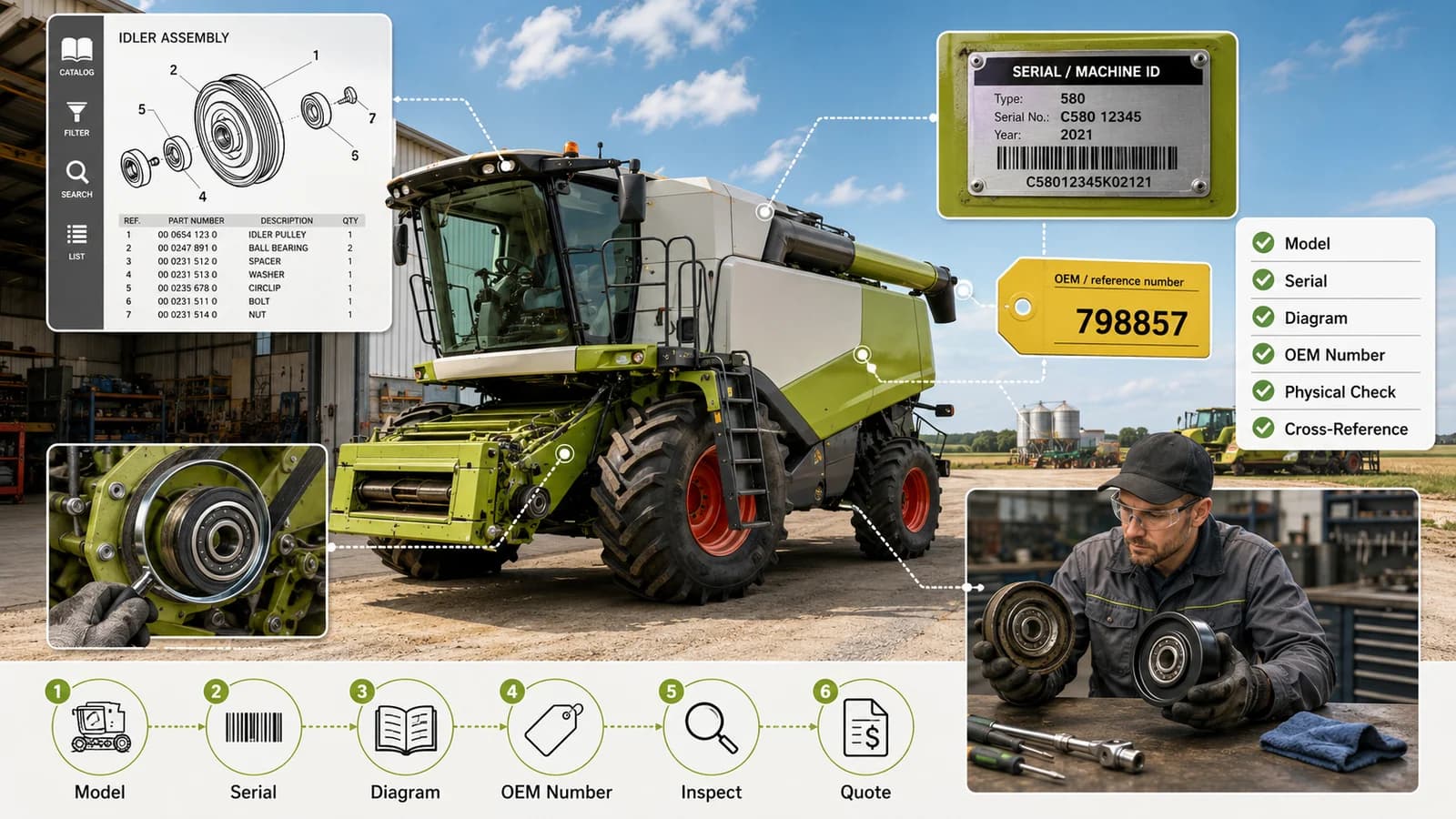
Illustration disclosure: The model plate, serial values, diagram labels, and pictured component are workflow examples only. Reference 798857 is a supplier-listed lookup candidate, not confirmed CLAAS fitment or a genuine-OEM identity claim.
Looking up a CLAAS combine replacement part is most reliable when the machine record, illustrated assembly, and complete OEM or reference number agree. A model name alone can lead to several production ranges or configurations, while a number copied from an old invoice may refer to an earlier service record, an assembly, or a superseded part.
This guide gives dealers, repair shops, and farm maintenance teams a repeatable way to move from a CLAAS model to a documented aftermarket cross-reference. It is a research and inquiry workflow, not a substitute for the current official parts information or a technician's installation decision.
CLAAS parts lookup by model, serial evidence, and OEM number
Begin with the complete machine designation and serial information. Use CLAAS Parts Doc through CLAAS connect, when your account and market access allow it, to select the specific machine and open the illustrated assembly. Record the complete reference shown for the component, including punctuation and revision details. You can then search that reference in the FieldFit CLAAS catalog or the combine parts category.
Each input answers a different question:
- The model identifies the machine family and relevant documentation.
- The serial number or production information helps narrow configuration boundaries.
- The illustrated assembly establishes where the component is used.
- The complete OEM or reference number becomes the cross-reference key.
- The removed part supplies the physical evidence needed to challenge a weak match.
A published FieldFit result is currently in stock and available for supplier-record review. It does not state the exact quantity, dispatch timing, or fitment for every machine carrying that model name. Request current quantity, price, and dispatch timing only after the evidence has been compared.
Collect evidence before searching
Keep the removed part and create a short lookup record before opening multiple catalogs. Record:
- Full CLAAS machine model and variant.
- Machine serial number, production range, or other identification shown on the plate.
- Every number stamped, cast, printed, or labeled on the component.
- Assembly name and the component's location in that assembly.
- Clear photographs of the complete part, markings, mounting points, and connections.
- Measurements relevant to the interface, such as shaft diameter, hole spacing, port or thread size, connector type, length, offset, tooth count, or rotation.
- Any prior repairs, conversions, or non-factory changes in the area.
Preserve the original formatting in your notes. Search tools may remove spaces, dots, or hyphens, but those details help distinguish a complete identifier from a partial number or transcription error.
Use official CLAAS documentation first
CLAAS describes Parts Doc as an electronic spare-parts catalog that registered CLAAS connect users can use to identify and order parts for specific machines. That makes the official system the appropriate starting point for establishing the model, diagram, item position, and current service reference.
CLAAS also provides technical documentation services for current and older machines. Access and document coverage can vary by market, machine age, and account. When the required record is unavailable, ask an authorized CLAAS contact or qualified parts specialist for the correct diagram and applicable reference rather than filling the gap with a visually similar marketplace listing.
Official documentation should help establish:
- That the selected catalog matches the complete combine model.
- That the component appears in the same illustrated assembly and position.
- That serial or production notes include the machine being repaired.
- Whether the reference has been replaced or divided by configuration.
The official record is necessary evidence, but the machine may have been repaired or modified after it left the factory. The installed component still needs a physical comparison.
A practical CLAAS cross-reference workflow
1. Select the specific machine
Avoid beginning with a broad search such as “CLAAS combine bearing” when the model and machine identification are available. Select the exact machine in the official system and use serial or production information where supported. Similar model names do not prove that the same assembly or component was used throughout production.
2. Locate the illustrated assembly
Open the system containing the component and confirm its position in the diagram. A generic name such as pulley, roller, sensor, chain, or tube can appear in several assemblies. Diagram context is often more useful than the everyday name.
3. Record the complete service reference
Copy the number exactly and note any alternate or replaced reference shown by the official source. If the number on the removed part differs from the catalog, preserve both and document the relationship instead of assuming they are interchangeable.
4. Search the supplier catalog
Enter the complete reference in FieldFit search. For example, FieldFit has a published supplier record associated with CLAAS reference 798857. That record is a lookup candidate supported by the source catalog; this guide does not claim what the component is or which machine it fits without the matching official and physical evidence.
When a search returns several products, do not choose by photograph alone. Compare the product record, supplier source, reference formatting, and any verified application evidence.
5. Compare the installed interface
Use the removed component and the official diagram to compare the features that control installation and operation.
| Evidence | What to compare |
|---|---|
| Mounting | Hole count, spacing, bracket geometry, fastener size, and orientation |
| Drive interface | Shaft, spline, keyway, pulley profile, tooth count, and rotation |
| Hydraulic or electrical interface | Port, thread, plug, pin count, connector keying, and direction |
| Overall geometry | Length, width, offset, bend, clearance, and contact surfaces |
| Identification | OEM number, revision, manufacturer code, and direction markings |
Use consistent measurement methods. A single photograph rarely establishes scale or confirms a close-tolerance interface.
6. Reconcile conflicts before requesting supply
Stop when the OEM number, diagram, serial applicability, or physical interface conflicts. The cause may be a modified machine, a number read from the wrong item, a catalog selection error, a supersession, or incomplete supplier data. The conflict is useful evidence and should be included in the inquiry.
Give priority to the current official record, machine identification, assembly position, and installed interface. An uncited cross-reference or marketplace title should not override them.
7. Send a complete quote request
Include the CLAAS model, serial details, OEM or reference number, assembly location, required quantity, photographs, measurements, and the official lookup result. State what is confirmed and what remains uncertain. Submit those details in a replacement-part quote request so FieldFit can review the supplier record and report current price, availability, and lead time without overstating fitment.
Common CLAAS lookup mistakes
Searching only by model. A combine contains many components with similar names, and a model can span several configurations. The model is a catalog selector, not a unique part identifier.
Treating the first cross-reference as final verification. Supplier data can support discovery, but its application claim may omit serial boundaries, assembly notes, or the source of the association.
Dropping dots, spaces, or suffixes from the evidence record. Normalized search may still find a candidate, but the original formatting helps detect incomplete numbers and revisions.
Assuming “in stock” means an exact quantity or dispatch promise. Current FieldFit listings are in stock, but the per-SKU quantity feed is not yet connected. Confirm exact quantity and dispatch timing with the quote.
Using installation guidance from an unidentified configuration. Torque values, calibration steps, and safety procedures must come from the current technical documentation for the exact machine and repair.
When to ask CLAAS or a qualified technician
Escalate the lookup when the serial range is missing, the number maps to multiple diagrams, the component is safety-critical, software or calibration is involved, the machine has been modified, or the old and proposed interfaces differ. A parts lookup guide cannot resolve a configuration that the available evidence does not identify.
Keep the question narrow: provide the machine identification, assembly, old number, proposed reference, photographs, and the exact conflict. That gives the dealer, technician, or supplier a better basis for an answer.
Official references
CLAAS and its model names are trademarks of their respective owner. FieldFit Parts is not affiliated with or endorsed by CLAAS. OEM numbers and model names are used for identification and compatibility reference only. Always confirm the current official catalog record, serial applicability, and the machine's actual configuration before ordering or installing a replacement part.
Continue to the catalog
Related Combine Parts Catalogs
Move from lookup guidance to published brand-specific parts. Search by the complete OEM or reference number and confirm the machine details before ordering.